Configuring Application Groups (AGs)
Users specify high-level business objectives through Application Groups.
The Customer traffic is classified using a mix of the user's applications
and organization data. The Application Group attributes include:
|
•
|
QoS performance objectives (nominal bandwidth per application
session, delay, jitter, packet loss, SRT, RTT and TCP retransmission), |
|
•
|
the enabling of compression. |
The user's objectives are the only input to the system. There is no
need to set low-level, network and device specific policy rules.
The Application Configuration system performs:
|
•
|
the configuration of high-level QoS objectives |
|
•
|
Application Control in accordance with the AGs |
|
•
|
Compression in accordance with the AGs |
|
•
|
Dynamic WAN Selection for
the flows in accordance with the AGs |
Application Groups are independent of Application Visibility, Application Control, Compression and Dynamic WAN Selection.
Application Groups are given in a tree structure, each AG is characterized
by:
|
•
|
filters to define the rules of traffic classification corresponding
to the AG, |
|
•
|
a criticality level associated
with the application(s) in this AG, |
|
•
|
a QoS profile that enables QoS objectives for the application(s)
in this AG, |
|
•
|
the capability to be compressed. |
Warning: The position of the Application Groups in the tree structure
is important because it determines the classification of the packets. Classification
is performed by running the structure tree downwards. Any packet is classified
with the first applicable classification met. 'Other' is positioned at the bottom of the tree.
The configuration of the Application Groups is necessary for Application Control.
|
1
|
In the Application provisioning Toolbar, select  Application Groups: Application Groups: |
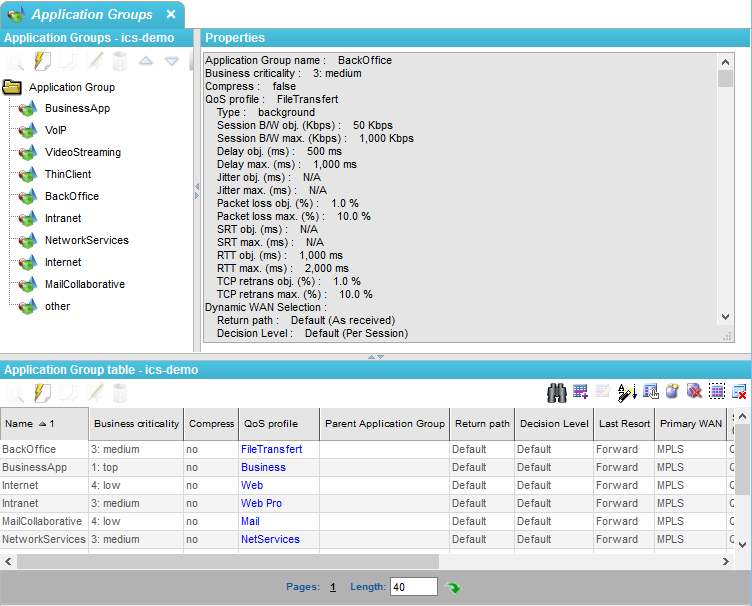
The Application Groups window is displayed:
This window contains:
|
•
|
An Application Groups zone
which shows the tree of AGs, |
|
•
|
A Properties zone which
shows the configuration of the selected AG, |
|
•
|
An Application Group table which
summarizes all the AGs. |
|
2
|
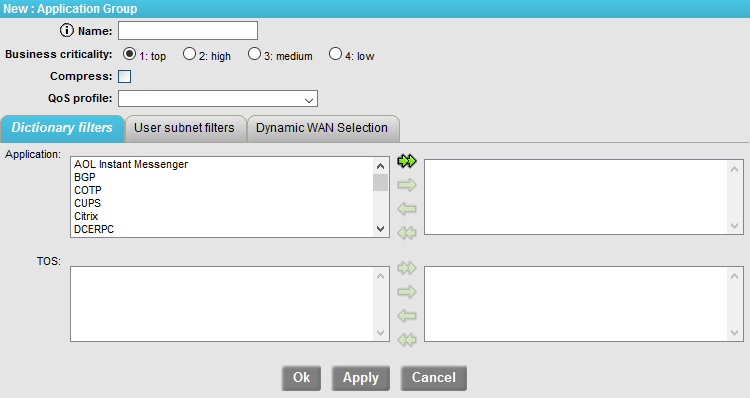
Click on the New icon  to open the AG creation window: to open the AG creation window: |
This window contains:
|
•
|
A zone displaying the characteristics of the selected Application
Group: |
|
•
|
Business criticality: top, high, medium or low, |
|
•
|
Compress: the compression capability for the flows belonging to the AG, |
|
•
|
QoS profile: the QoS profile that will apply to this AG (the QoS profile contains the Type of traffic, the Bandwidth objective and maximum values, the D/J/L, RTT, SRT and TCP retransmit objective and maximum values), |
|
•
|
Sensitivity, Routine or Business: when the sites are connected through various networks (e.g. MPLS
and Internet), or use various Network Access Points to the same network,
the Sensitivity is used in the path decision to route traffic to a WAN access
with at least the same Trust Level (defined on the WAN accesses). Dynamic WAN Selection must be activated in the license. |
|
•
|
A zone with four tabs, to define filtering rules for traffic
classification in the corresponding AG: |
In this zone, the selection zones depend on the selected tab (see below).
|
•
|
the left zone shows a list of elements of the Dictionaries (Applications, ToS values), User subnets (source and destination) |
|
•
|
the right zone shows the selected filters for the AG |
|
3
|
Select elements (you can select several elements simultaneously, using the
SHIFT or CTRL keys) and move them from one zone to the other thanks to the
simple arrows, or move all the elements at a time using the double arrows. |
Note: A logical Or is applied for the different elements
inside a filter (for example filter Applications: HTTP or HTTPS).
Note: A logical And is applied for the different types of filters
(for example Applications: HTTP or HTTPS and subnet-src=LAN-192).
Dictionary filters tab
This tab contains two filters:
This is the main tab to use. Others are optional and lead
to the creation of local rules, so use them with care.
User Subnet filters tab
This tab contains two filters:
|
•
|
Sources: User subnets directory
to be used as sources |
|
•
|
Destinations: User subnets
directory to be used as destinations |
Warning: By selecting Subnets with this tab, you create local rules that will apply only to those Subnets! Do this only
if really needed. Otherwise, use global parameters only (Dictionary filters).
Dynamic WAN Selection tab
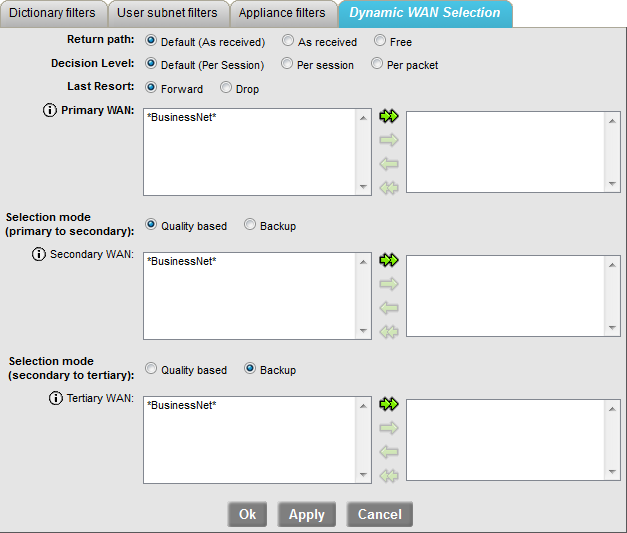
This tab contains Dynamic WAN Selection parameters.
|
•
|
The first two parameters, Return path and Decision Level, are also present in the System provisioning > Tools > Advanced configuration menu (refer to "Configuring Advanced Settings"). |
|
•
|
They will take the global values selected there if set to "Default" here (the global values are indicated into brackets). |
|
•
|
The global values can be overwritten by selecting different values here. |
|
•
|
Last Resort: if no decision is made (no "good" WAN Access to be selected), traffic is: |
|
•
|
either sent on “NAP 0” (Forward) |
|
•
|
Primary WAN: specify the favorite WAN for this Application Group by selecting it in the left frame and pushing it to the right with the single right arrow. If several WANs are selected, then load balancing will be applied between them. |
|
•
|
Selection mode (primary to secondary): |
|
•
|
Quality based (default): the Secondary WAN can be selected instead of the Primary WAN (if the Primary WAN is broken), or if the quality of this Application Group is better on the Secondary WAN than on the Primary WAN, |
|
•
|
Backup: the Secondary WAN can be selected instead of the Primary WAN if this one is broken, and only in that case. |
|
•
|
Secondary WAN: specify the second favorite WAN for this Application Group by selecting it in the left frame and pushing it to the right with the single right arrow. If several WANs are selected, then load balancing will be applied between them. |
|
•
|
Selection mode (secondary to tertiary): |
|
•
|
Quality based (default): the Tertiary WAN can be selected instead of the Secondary WAN if it is broken, or if the quality of this Application Group is better on the Tertiary WAN than on the Secondary WAN, |
|
•
|
Backup: the Tertiary WAN can be selected instead of the Secondary WAN if this one is broken, and only in that case. The decision diagram below summarizes the whole mechanism (where 1ry stands for Primary, 2ry stands for Secondary, 3ry stands for Tertiary, Promisc. stands for Promiscuous [a WAN Access that has no WAN specified is considered to be attached to an internal WAN called “Promiscuous”] and Ǝ ...? stands for "Does ... exist?" - or "Is there a ... available?"). |
|
•
|
Tertiary WAN: specify the last acceptable WAN for this Application Group by selecting it in the left frame and pushing it to the right with the single right arrow. If several WANs are selected, then load balancing will be applied between them. |
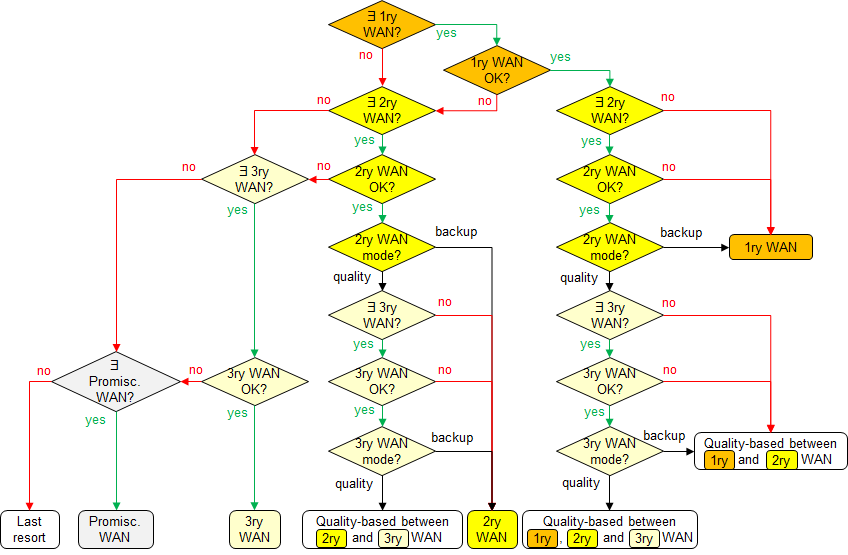
Note: there can be several Primary, several Secondary and several Tertiary WANs, but a given WAN cannot be both Primary and Secondary. For instance, if the decision is “Primary WAN”, and if two of them are defined, then the final decision is load- and quality-based between the two WANs.