Configuring Local Traffic Limiting
Local Traffic Limiting allows traffic limiting rules to be configured
for each site, when this is necessary. These rules take the enterprise organization,
user subnets and applications implemented between these different entities
into account. They are used by Application Control.
These rules are defined for outgoing (LTL Ingress) or incoming (LTL
Egress) traffic on the selected site.
LTLs are used to limit the bandwidth used by the different networks of the
departments, services (user subnets) or applications according to specific
criteria taking the following constraints into account:
Traffic Limiting is given in a tree structure, each LTL is characterized
by:
|
•
|
filters to define the rules for classifying the traffic that corresponds
to the LTL |
|
•
|
a limit on the bandwidth that can be used by the class |
Note: LTL rules are enabled if and only if Application Control is activated on the Appliance.
|
1
|
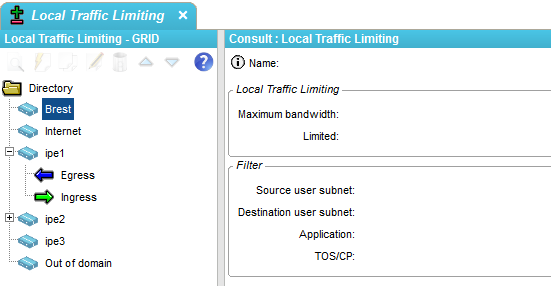
In the Application provisioning Toolbar, select  Local Traffic Limiting. Local Traffic Limiting. |
The Local Traffic Limiting Tree window
is displayed.
This window contains a Local Traffic Limiting tree structure per Appliance.
|
2
|
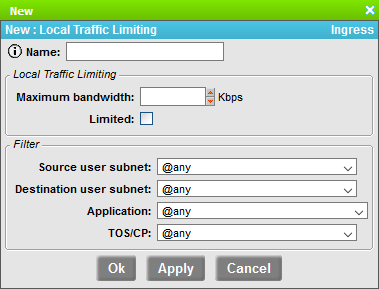
To create a new policy, select the Appliance and the direction (ingress or egress). Then click the New
icon  to display the following window: to display the following window: |
This window contains the following parameters:
|
•
|
Name: Name of the LTL policy, |
Local Traffic Limiting
|
•
|
Maximum bandwidth (kbps):
to specify the limit bandwidth for a LTL. If the value 0 is specified, all the traffic is dropped. |
|
•
|
Limited: to enable or disable
the limiting rule. |
Filters
You may filter the traffic related to a LTL. The available options are:
|
•
|
Source user subnet: to
filter the traffic by Source User subnet. Select it from a drop-down
list that corresponds to the "User subnets" directory, |
|
•
|
Destination user subnet:
to filter the traffic by Destination User subnet. Select it from
a drop-down list that corresponds to the "User subnets" directory, |
|
•
|
Application: to filter
the traffic by application. Select it from a drop-down list
that corresponds to the "Applications" dictionary, |
|
•
|
TOS/CP: to filter the traffic
by TOS value. Select this value from a drop-down list that corresponds to the "TOS/CP"
dictionary. |